What Security Cameras Work With Local SD Card Storage (No Cloud)?
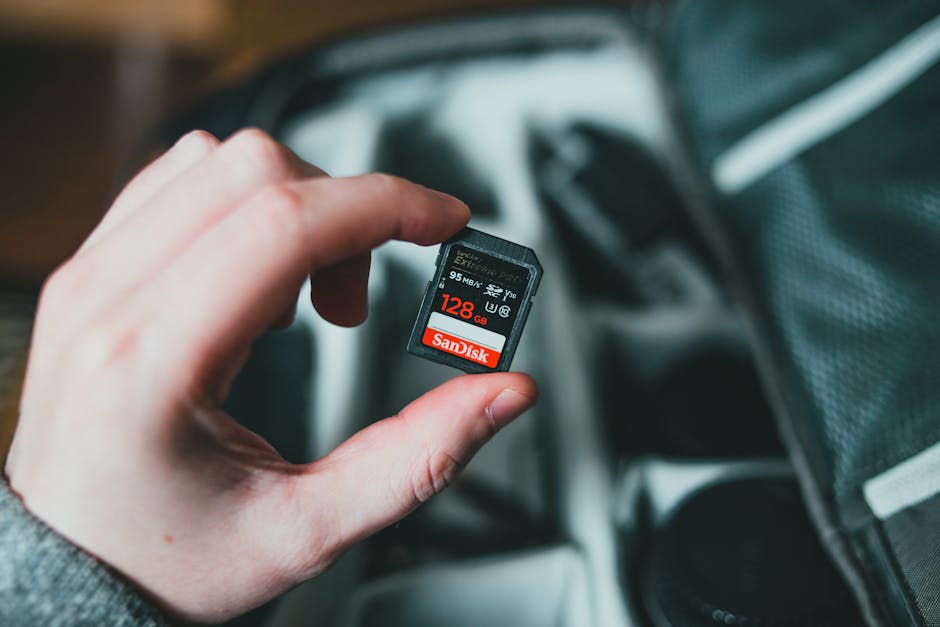
SensForge cameras are designed specifically for local SD card storage with no cloud requirement. The SensForge Indoor Pan-Tilt Camera ($35.99) and Rechargeable Indoor Pan-Tilt Camera ($49.99) both record directly to SD cards up to 128GB. All footage stays on your device — nothing uploaded to the cloud unless you explicitly choose to enable it. This approach gives you complete privacy, works during internet outages, and costs nothing per month.
Why Local Storage Matters
The cloud storage industry has created a misconception: that footage needs to be backed up to remote servers to be useful. This isn't true.
The reality: - Local storage is actually more private - Local storage works when your internet is down - Local storage never expires (no cloud subscription) - Local storage doesn't require any company to store your footage
Yet companies like Ring and Nest make cloud storage sound essential. They market it as a "premium feature" and charge $10-20 per month. But local storage works perfectly for most people.
How Local SD Card Storage Works
Step 1: Insert the SD Card Buy a standard microSD card (Class 10, 32GB or larger). Insert it into your camera's SD card slot.
Step 2: The Camera Records The camera records video continuously. As the card fills up, it automatically loops and overwrites old footage. This means: - A 128GB card holds about 7-14 days of continuous video - Once full, new footage replaces the oldest - You never run out of storage space - No cloud subscription required
Step 3: Access Your Footage Through the SensForge app, you can rewind and watch any recent moment. You can also view footage directly by removing the SD card and playing it on a computer.
Local Storage vs. Cloud Storage
| Feature | Local SD Card | Cloud Subscription | |---------|---------------|------------------| | Privacy | Complete (footage never leaves your home) | Limited (company stores your video) | | Works Without Internet | Yes | No | | Storage Cost | $15-25 one time | $10-20 per month | | Data Expiration | Never expires | Usually 30-60 days | | Speed | Instant local access | Depends on internet speed | | Search Features | Basic (rewind) | Advanced (AI search) | | 5-Year Cost for One Camera | $25 | $600+ |
The SensForge Local Storage Solution
SensForge Indoor Pan-Tilt Camera ($35.99) - Supports SD cards up to 128GB - Records continuously to local storage - App lets you rewind and watch recent footage - No subscription required - Works even if internet goes down
SensForge Rechargeable Camera ($49.99) - Same features as above - Plus 4-hour battery backup during power outages - Keeps recording when power fails
Both cameras let you record to SD card indefinitely. The footage stays in your home. You control who accesses it.
Real-World Scenarios
Scenario 1: Power Outage Your internet router goes down. With a cloud-based camera (Ring, Nest), you can't access live view or check recent footage. With SensForge local storage, your SD card keeps the footage safe. When power returns, all the video from the outage is still there.
Scenario 2: Privacy Concern You're uncomfortable with footage of your home being stored on someone else's servers. With local SD storage, that footage never leaves your camera. It stays physically in your home.
Scenario 3: Long-Term Footage You want to keep 2 months of footage as a backup. Cloud services typically expire footage after 30-60 days unless you pay for extended storage. With a large SD card, you can keep as much as you want for a one-time cost.
How to Choose an SD Card
Not all SD cards work equally in security cameras. Here's what to look for:
Capacity: 32GB, 64GB, or 128GB (larger = more days of footage)
Speed Class: Look for U3 or V30 ratings. These are fast enough for continuous video recording.
Brand: SanDisk, Samsung, Kingston are reliable. Avoid ultra-cheap no-name cards.
Recommended Setup: A 128GB Class 10 card costs about $20-25 and holds roughly 7-14 days of continuous video.
When Cloud Storage Makes Sense
Local SD storage is great for most people, but cloud storage does have value:
You should use cloud if: - You want AI-powered search through footage (person/package detection) - You want footage backed up in case the camera is stolen - You're willing to pay for it
Local storage is fine if: - You're checking recent footage (rewind is fast enough) - Privacy is your priority - You want zero monthly costs - You can occasionally remove the SD card as a backup
The SensForge Approach to Your Data
SensForge believes you should own your footage. That's why: 1. SD card recording is built in (not an extra fee) 2. Cloud backup is optional (not required) 3. Local access to the app works without cloud 4. You can remove and backup your SD card anytime
It's simple: you buy a camera, you own your footage.
Shop SensForge Cameras with Local Storage →
---
Frequently Asked Questions
Q: What happens if my SD card fills up? A: The camera automatically loops and overwrites the oldest footage. If you have 7 days of video on a full card, the camera will continue recording. The oldest footage (from 8 days ago) will be deleted to make room for today's recording.
Q: How long does a 128GB SD card last? A: Typically 7-14 days of continuous recording, depending on resolution (1080p uses less storage than 2K). For motion-based recording only, it could last 30+ days.
Q: Can I access footage if my internet goes down? A: Yes. You can rewind the live feed on your camera (if you're on the same WiFi network) or remove the SD card and view it on a computer. The footage doesn't require any cloud service.
Q: Are SensForge cameras compatible with any SD card? A: SensForge works with standard microSD cards (Class 10 or faster). We recommend 64GB or 128GB cards for optimal performance. Avoid super cheap brands as they may not be reliable.
Q: Can I use local storage AND cloud storage at the same time? A: Yes. You can record to SD card while also enabling cloud backup. However, we recommend local storage as your primary and cloud as optional backup. Most users find local SD cards sufficient.
Q: What's the total cost of ownership with local storage? A: Camera ($35.99) + SD Card ($20) = $55.99 one time. No monthly fees. That's about 10% of what cloud subscriptions cost over 5 years.